SEPTEMBER 29, 2026
Digital Menu Boards in Akron: Restaurant Installation Guide
Restaurants planning digital menu boards in Akron should settle their content, screen locations, electrical access, network connection, and update process before installation begins. The displays need to remain readable during a busy lunch rush, fit the ordering flow, and stay easy for staff to update when an item sells out or a price changes. At UnlimitComp, we approach digital signage as a complete business system rather than a screen mounted above the counter.
Early planning prevents common problems such as glare, text that customers can’t read from the line, exposed cables, and a content platform that only one employee understands. Here’s what restaurant owners and managers should decide before requesting an installation quote.
Define What the Digital Menu Boards Need to Do
Start with the customer’s experience.
Where do customers first look for the menu? How far away are they when they begin making a decision? Does the line move past several displays, or do people order as soon as they enter? A counter-service restaurant may need customers to read the full menu from the back of a line. A café might use one board for core drinks and another for seasonal items.
Decide what each screen will show before selecting its size. The content might include menu categories, prices, product photos, limited-time items, sold-out notices, or ordering instructions. Some restaurants also reserve part of a display for promotions, but that space shouldn’t make the actual menu harder to scan.
A clear content plan answers several practical questions:
- How many menu categories need to appear at once?
- Will every screen show a separate section?
- How often do prices and items change?
- Does the restaurant need different breakfast, lunch, or dinner menus?
- Who will publish urgent updates?
- Will every location use the same content?
These decisions affect the number of displays, screen orientation, content management platform, and network setup.
Measure the Customer’s Viewing Distance
Screen size should relate to viewing distance and content density.
A large display won’t solve a menu layout that uses tiny type. Likewise, a well-designed menu may still fail if customers stand too far away to read it comfortably. Measure the distance from the proposed screen location to the beginning, middle, and front of the ordering line.
Then consider viewing angle. Customers shouldn’t have to lean around a fixture or stand directly under the screen. Tall equipment, hanging lights, decorative elements, and other customers may block part of the view.
A site walk through during business hours gives the installer a more accurate picture than an empty dining room. It shows where people naturally stand, how lines form, and whether customers enter from more than one direction.
The display height matters too. Mounting screens too high may create an uncomfortable angle, especially in a narrow ordering area. Screens positioned too low can disappear behind employees, counter equipment, or customers waiting at the register.
Check the Light Before Installing Digital Menu Boards in Akron
Restaurant lighting changes throughout the day.
Morning sun may hit a front-facing screen even if the display looks clear during an afternoon walk through. Large windows, polished counters, pendant lights, and glossy wall finishes can create reflections. Glare becomes especially noticeable on dark content backgrounds.
Visit the proposed screen location at different times if direct sunlight reaches the ordering area. Window coverings or a different mounting angle may improve visibility. The display itself also needs enough brightness for the room.
Outdoor menu boards face a different set of conditions. Exposure to rain, snow, temperature changes, direct sunlight, and moisture requires equipment and mounting choices suited to that environment. An indoor television placed in an exterior enclosure shouldn’t automatically be treated as the equivalent of a purpose-selected outdoor display.
Akron’s seasonal changes make this review worthwhile. A location that stays shaded in summer may receive stronger direct light when trees lose their leaves. Winter darkness can also change how bright a screen feels compared with the surrounding room.
Confirm Power and Cabling Before Walls Are Finished
Every digital menu board needs a clean, reliable connection to power and its content source.
Restaurants should identify electrical access before choosing the final mounting position. Extension cords and visible cables create a poor finished appearance and may interfere with cleaning or daily operations. If the location is undergoing construction or remodeling, coordinate the display installation before walls and ceilings close.
Network cabling may also need to reach the display area. A wireless connection is convenient, but a wired connection may provide greater consistency in a busy commercial environment. The right option depends on the building, content platform, screen locations, and current network.
Our structured cabling services cover organized cabling for business technology systems. Planning these pathways early gives installers a cleaner route and reduces the chance that newly finished surfaces will need more work later.
Restaurants with several displays should also decide where media players, adapters, power supplies, and other components will sit. Equipment needs ventilation and service access. Hiding every component above a ceiling or behind an inaccessible wall may make a future restart or replacement unnecessarily difficult.
Review the Restaurant’s Network
Digital signage often relies on a network connection for content updates, scheduling, monitoring, and integration’s.
A restaurant’s network may already support point-of-sale terminals, employee devices, guest Wi-Fi, security cameras, online ordering, and other connected equipment. Adding digital menu boards introduces another business system that needs dependable access.
Before installation, review Wi-Fi coverage or wired connectivity near the displays. Confirm that the network can support the proposed setup without mixing sensitive business systems into poorly organized connections.
UnlimitComp’s network design services address network planning, hardware and software selection, wireless design, security, and future growth. If a restaurant plans to add screens across several areas or locations, a structured network plan makes ongoing management much easier.
The business should also keep administrative credentials under its control. Record which accounts manage the signs, who owns those accounts, and how access will transfer if an employee or vendor relationship changes.
Choose a Content Management Process Staff Will Use
A strong display installation can still become frustrating if content updates take too long.
UnlimitComp’s digital signage solutions include cloud-based content management with remote updates, scheduling, playlists, and system monitoring. Multiple displays can be managed through one dashboard.
Before launch, decide who owns the menu content. A restaurant manager might handle sold-out items and daily changes, while a marketing employee controls brand graphics and scheduled campaigns. Each person should receive the access required for their role without sharing one general password.
Set a basic approval process for prices, descriptions, and promotions. A mistake on a digital menu can spread to every screen quickly. Staff should know who checks an update before it goes live and who corrects errors during service.
Scheduling also deserves a test. Confirm that breakfast content changes at the correct time, seasonal promotions expire as intended, and every screen returns to its normal menu afterward. If the internet connection drops, ask what the displays will continue showing and how staff will recognize the problem.
Build the Menu for Fast Reading
Customers rarely study a menu board word by word. They scan for a familiar category, compare a few choices, and look for the price.
Keep item names and descriptions concise. Use clear contrast between the text and background. Product photography should support the menu instead of pushing essential details into smaller spaces.
Motion needs restraint. Video and animation may attract attention, but constant movement near prices or category headings can make ordering slower. If several displays sit together, avoid running unrelated motion across every screen at the same time.
Restaurants should test menu designs from the actual ordering line, not from a computer monitor. Ask someone unfamiliar with the layout to find a specific item, variation, and price. If the answer takes too long, revise the hierarchy before installation day.
Accessibility belongs in the planning conversation as well. Readable type, strong contrast, logical organization, and an ordering process that doesn’t depend entirely on distant screens create a better experience for more customers.
Account for Menu Labeling Requirements
Some restaurant chains must follow federal menu labeling rules.
The U.S. Food and Drug Administration’s menu labeling requirements generally apply to restaurants and similar retail food establishments that operate under the same name and are part of a chain with 20 or more locations. Covered businesses must display calorie and other required nutrition information in specified ways.
Smaller restaurants may not fall under that federal rule, but they should still verify which requirements apply to their business. Regulations, franchise standards, brand policies, and local operating needs should shape the content before templates are finalized.
Technical installers shouldn’t make the restaurant’s legal or nutritional decisions. Management should provide approved wording, prices, calorie information, and disclaimers so the content system displays accurate material.
Decide How the Boards Will Connect With Other Systems
Digital menu boards may operate as a stand-alone display system or connect with other restaurant technology.
UnlimitComp supports integration with point-of-sale systems, inventory management, social media feeds, weather services, and other business applications. An integration may allow menu content to reflect current information without requiring someone to edit each screen manually.
Before choosing that route, clarify what data will update automatically. A restaurant might want a sold-out product removed from a screen, but an incorrect inventory count could hide an item that’s still available. Management should understand what triggers each change and how staff override it.
Ask who supports the connection if one system updates and the integration stops working. The signage platform, point-of-sale provider, and network team may each control a different part of the setup. Clear ownership avoids confusion during a busy shift.

Plan Installation Around Restaurant Operations
Digital Menu Boards Installation
Installation timing affects staff, customers, and revenue.
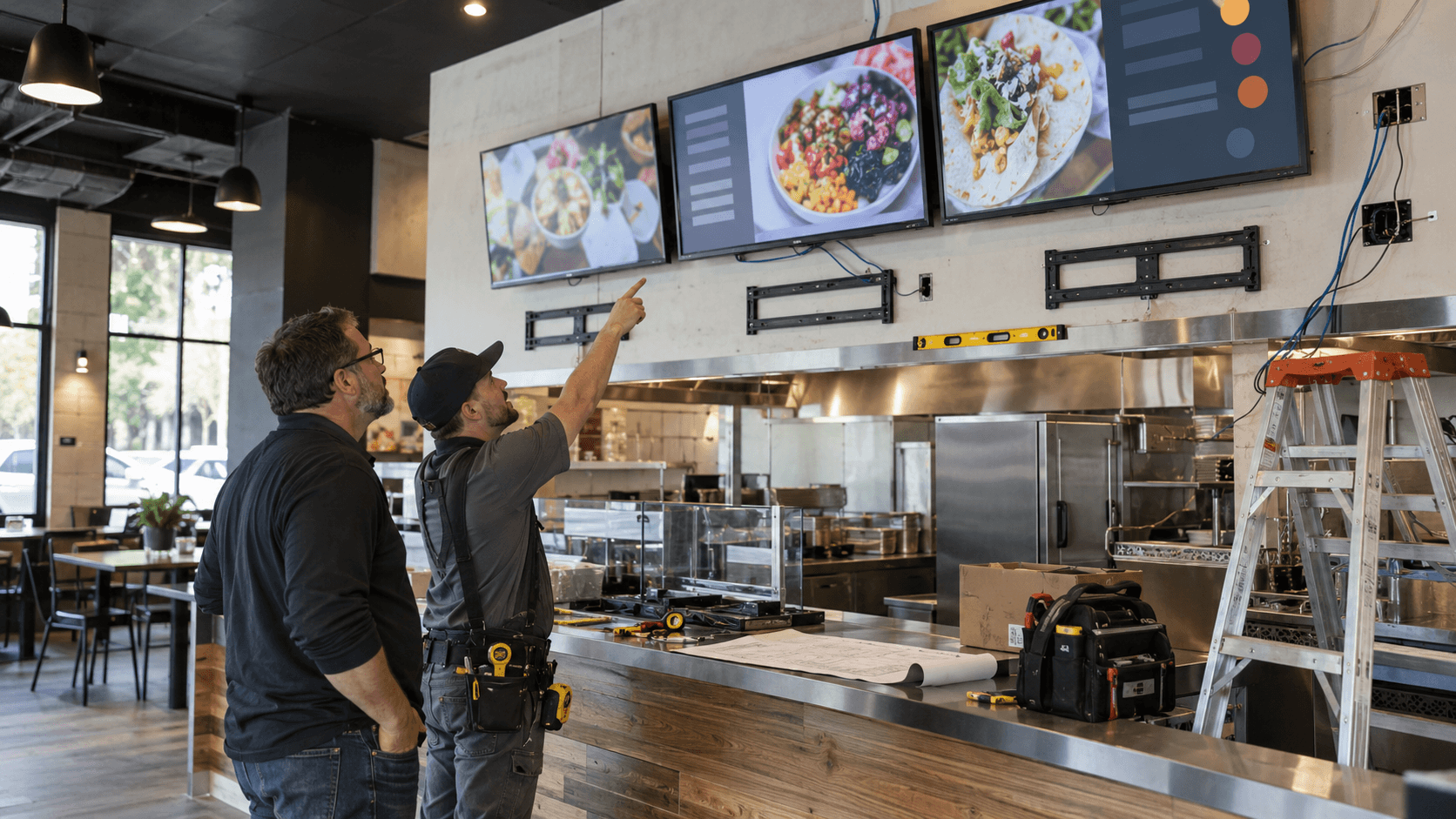
Mounting several displays above an active counter may require access to ordering areas, ceiling spaces, power, or network equipment. Dust, ladders, drilling, and temporary equipment shutdowns don’t mix well with food service.
Discuss operating hours and decide whether installers should work before opening, after closing, or during a planned renovation window. Remove food and equipment from nearby work areas when required. Someone from the restaurant should remain available to confirm screen positions before permanent mounting begins.
Content should be ready for testing before installation day. Use final or near-final menu files rather than placeholders. That allows the team to evaluate real type sizes, prices, images, transitions, and screen assignments from the customer’s viewpoint.
Prepare for Maintenance and Future Changes
Restaurant technology works in an environment with heat, grease, dust, moisture, and long operating hours.
Build screen cleaning into the restaurant’s routine, but follow the equipment manufacturer’s care instructions. Staff shouldn’t spray cleaning products directly onto a display or block ventilation while cleaning nearby surfaces.
Someone should periodically confirm that all screens show the correct content, scheduled changes occur on time, and remote access still works. Keep account records current and remove access for people who no longer need it.
UnlimitComp also provides technology maintenance services for business systems. Ongoing review becomes especially valuable when a restaurant operates several screens or depends on integration’s for frequent content changes.
Future menu changes deserve attention during the original plan. A restaurant may add another daypart, reorganize categories, introduce online-order pickup instructions, or expand to another location. A flexible layout and content structure will handle those changes better than a tightly packed design with no room to grow.
What to Bring to a Digital Menu Board Consultation
Restaurant owners don’t need to select every piece of equipment before speaking with an installer. A few details will make the first conversation far more productive:
- Photos and measurements of the ordering area
- Approximate customer viewing distances
- The number of menu categories and items
- Current menu designs or brand guidelines
- Hours and planned menu schedules
- Information about existing power and network access
- Any planned point-of-sale or inventory integration’s
- The names of employees who will manage content
- A realistic installation window
At UnlimitComp, we work across digital signage, audio and video, networking, structured cabling, and ongoing maintenance. That wider view lets us evaluate the screen, connection, mounting location, and management process as parts of the same project.
If your restaurant is planning digital menu boards in Akron, contact our team to schedule a conversation about the space and the way customers order. Before that meeting, measure the viewing area and outline who will update menu content. Those two details will clarify many of the decisions that follow.




Stay Connected
Subscribe for technology tips, service updates, and security insights.